Complete Website Launch Checklist (2026 Guide)
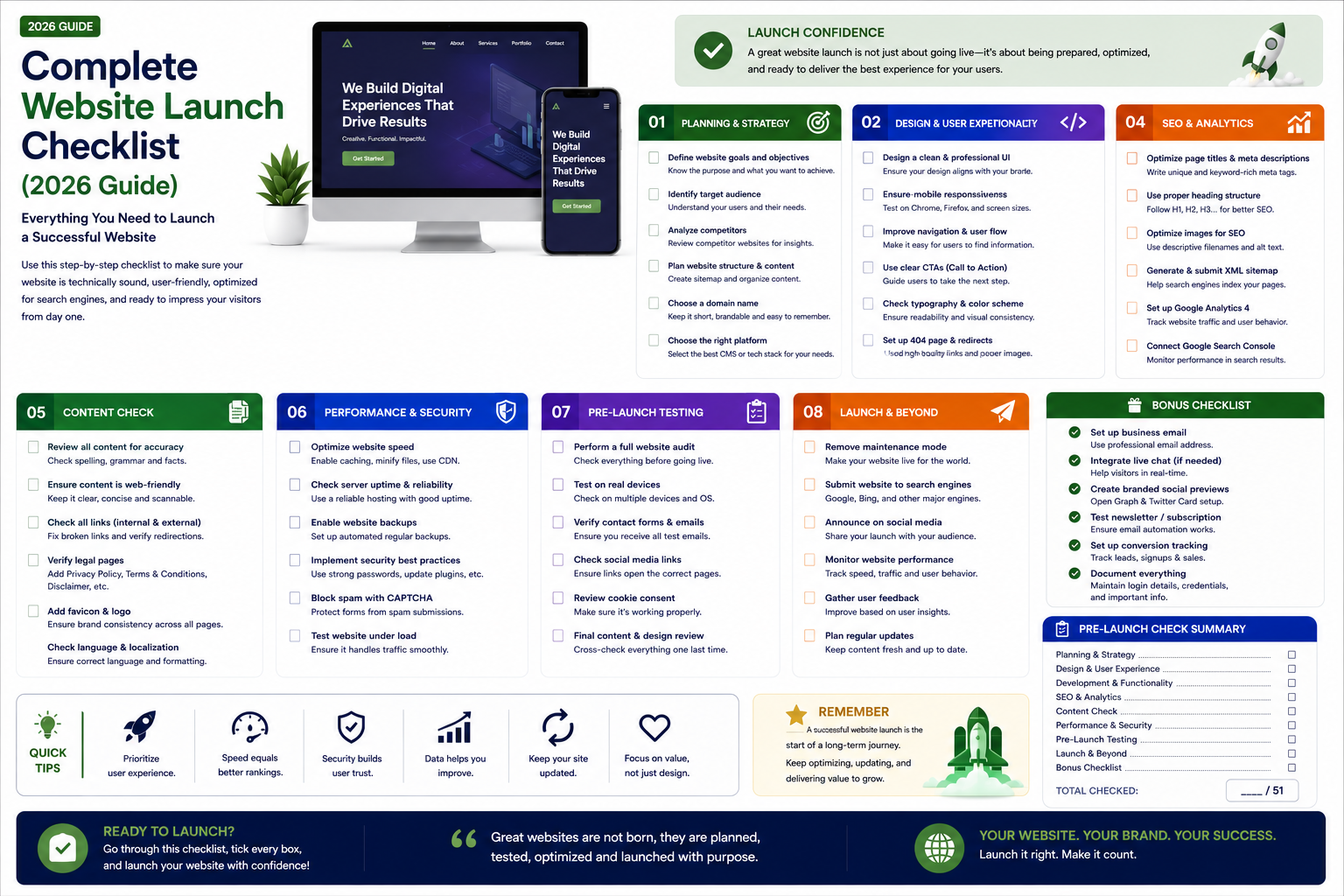

A comprehensive pre-launch, launch day, and post-launch checklist for your business website. Ensure nothing is overlooked when taking your new website live.
Complete Website Launch Checklist (2026 Guide)
Launching a new website is exciting, but it requires careful preparation to ensure everything works perfectly from day one. A single overlooked detail — a broken form, missing SSL certificate, or unsubmitted sitemap — can cost you leads, sales, and search rankings.
This comprehensive launch checklist covers every step you need to take before, during, and after your website goes live.
Pre-Launch Checklist
1. Content Review. Proofread all text for spelling and grammar errors. Verify all pricing, phone numbers, addresses, and email addresses are correct. Check that all placeholder content (lorem ipsum, stock images) has been replaced with final content. Ensure all pages have unique, descriptive meta titles and descriptions.
2. Visual Design Review. Verify consistent typography, colors, and spacing across all pages. Check that the website looks correct on mobile, tablet, and desktop. Test at actual device widths — 375px (iPhone), 768px (iPad), 1440px (desktop). Ensure buttons, links, and interactive elements have proper hover and focus states.
3. Functionality Testing. Test all forms — do they submit successfully? Are confirmation messages displayed? Are notification emails delivered to the correct recipients? Test all links — internal and external. Check that navigation menus work correctly. Verify search functionality returns relevant results. Test login, registration, and password reset flows if applicable. Test e-commerce functionality — add to cart, checkout, payment processing, order confirmation.
4. Performance Optimization. Run Google PageSpeed Insights and aim for a score of 90+. Optimize images — compress and convert to WebP/AVIF formats. Minify CSS and JavaScript. Enable browser caching and server-side caching. Configure a CDN. Test Core Web Vitals — LCP under 2.5s, FID under 100ms, CLS under 0.1.
5. SEO Setup. Create and validate XML sitemap. Configure robots.txt — ensure important pages are crawlable and admin pages are blocked. Set up 301 redirects from old URLs if this is a redesign. Add structured data (Schema markup) — Organization, WebPage, BreadcrumbList. Verify all pages have unique, keyword-optimized title tags and meta descriptions. Set canonical URLs to prevent duplicate content issues.
6. Security Measures. Install SSL certificate and force HTTPS across the entire site. Set up a firewall and DDoS protection. Configure regular automated backups. Implement secure authentication if your site has user accounts. Remove any development files, debug logs, or test accounts.
Launch Day Checklist
7. Domain and DNS. Point your domain to the production server. Verify DNS propagation (can take up to 48 hours, but usually faster). Test that www and non-www versions both resolve correctly.
8. Analytics Setup. Install Google Analytics 4 tracking code on all pages. Verify data is being collected in real-time reports. Set up Google Search Console and verify domain ownership. Submit XML sitemap to Search Console. Set up conversion goals — form submissions, purchases, phone calls.
9. Third-Party Integrations. Verify email marketing platform integration (Mailchimp, ConvertKit, etc.). Test CRM integration if leads are being sent to a CRM. Check live chat or chatbot functionality. Verify payment gateway processing (Stripe, Razorpay, etc.). Test social media sharing — Open Graph tags for Facebook, Twitter Cards.
10. Backup and Monitoring. Take a full backup of the production site. Set up automated daily backups. Configure uptime monitoring with alerts. Set up performance monitoring (Core Web Vitals tracking).
11. Final Review. Browse every page on the live site. Test all forms with real submissions. Complete a test purchase if e-commerce. Check Google Search Console for any immediate crawl errors. Verify the website loads correctly on actual mobile devices, not just browser resizing.
Post-Launch Checklist
12. First Week Monitoring. Monitor analytics for unexpected traffic patterns or drop-offs. Watch for crawl errors in Google Search Console. Check form submissions are being received correctly. Respond to any user feedback or bug reports quickly.
13. First Month Priorities. Start publishing blog content regularly. Begin building backlinks through outreach and content marketing. Set up and monitor Google Business Profile if you have a physical location. Review analytics to identify top-performing pages and optimization opportunities.
14. Ongoing Maintenance. Apply security updates promptly. Review and update content regularly — at minimum quarterly. Monitor Core Web Vitals and address any regression. Review analytics monthly to inform content and optimization decisions. Conduct full SEO audits quarterly.
Common Launch Mistakes to Avoid
Forgetting to remove noindex tags — many development sites block search engines. Launching without SSL certificate — browsers show security warnings. Not setting up redirects during a redesign — old URLs return 404 errors. Forgetting to update DNS settings — site works on staging but not production. Skipping form testing — leads are lost silently. Not submitting the sitemap — search engines take longer to discover new pages. Launching on Friday — if something goes wrong, you or your team may not be available over the weekend.
Why Choose RedGobble?
At RedGobble, we build high-performance digital products for startups, businesses, and enterprises. Our expertise includes custom website development, AI solutions, AI agent development, SaaS platforms, ERP and CRM systems, mobile app development, business automation, UI/UX design, SEO-friendly websites, and cloud deployment. Our launch process includes thorough pre-launch testing and post-launch monitoring to ensure your website performs perfectly from day one.
Based in Greater Noida, Uttar Pradesh, India, RedGobble provides custom software development, AI solutions, mobile app development, and web development services for businesses across India and worldwide.
Frequently Asked Questions
How long does website launch take?
The technical launch process takes a few hours. However, DNS propagation can take up to 48 hours, though it usually completes much faster.
What is the most common launch mistake?
Forgetting to remove noindex tags is one of the most common. Development sites often block search engines, and developers sometimes forget to remove this before launch.
Should I launch during business hours?
Yes. Launch when your development team is available to address any issues immediately. Avoid launching on Friday afternoons or before holidays.
How do I preserve SEO during a redesign?
Map all old URLs to new ones with 301 redirects. Maintain similar content structure. Submit the new sitemap promptly. Monitor Search Console for crawl errors.
How long should I monitor after launch?
Intensive monitoring for the first week, regular monitoring for the first month. Ongoing monitoring should be part of your website maintenance routine.
What if something breaks after launch?
This is why we offer post-launch support. Critical issues are addressed immediately. Minor issues are prioritized and resolved through our maintenance process.
Conclusion
A successful website launch requires meticulous preparation and attention to detail. By following this checklist, you minimize the risk of issues that could cost you traffic, leads, and revenue. The effort you invest in pre-launch testing pays dividends in a smooth launch and a website that performs optimally from day one.
Ready to start your project? Book a Free Consultation with the RedGobble team today.