How to Improve Website Speed (Complete 2026 Guide for Business Websites)
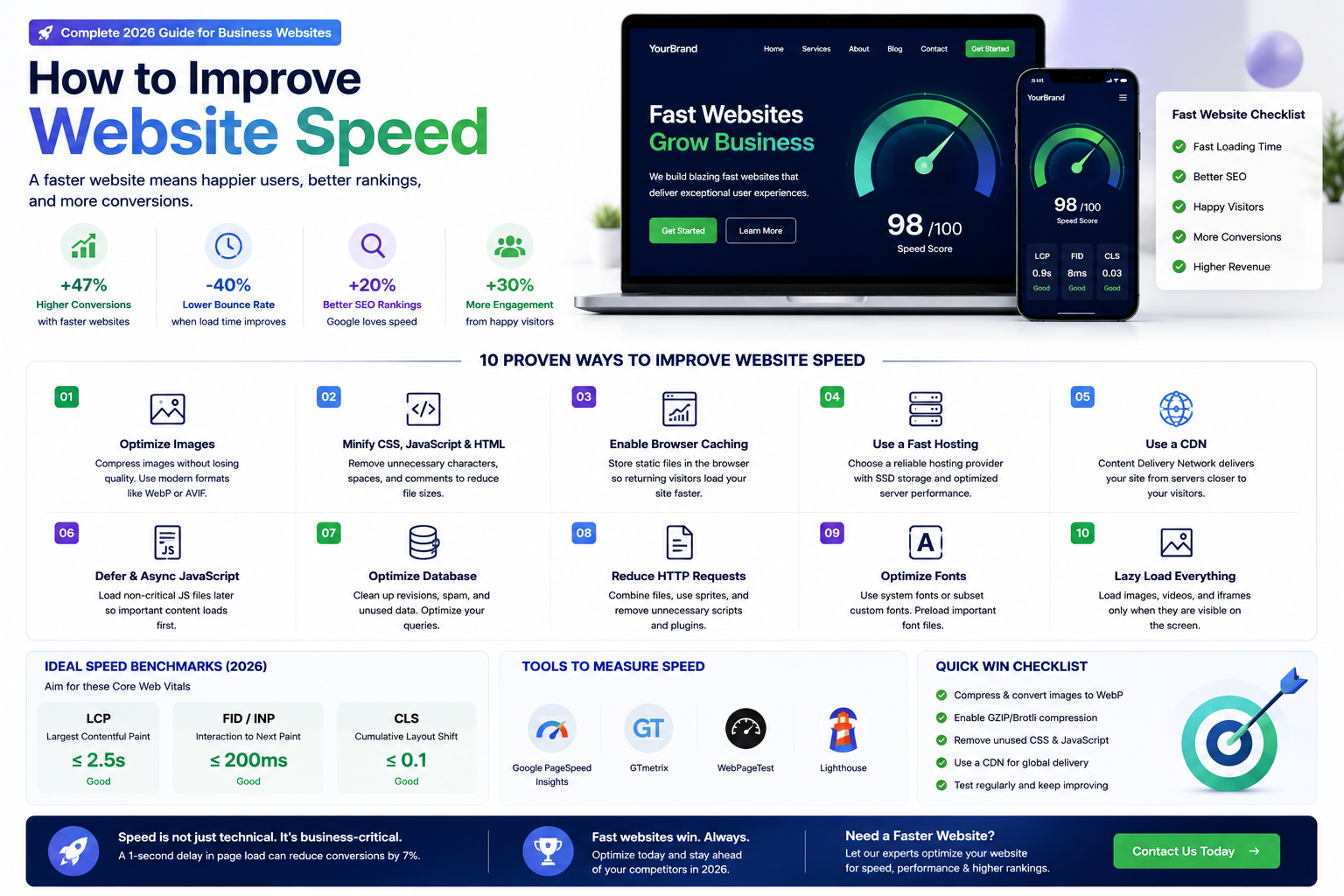

Learn proven techniques to improve your website speed including image optimization, caching, CDN, code minification, font optimization, and modern frameworks for better SEO and conversions.
How to Improve Website Speed (Complete Guide for 2026)
Website speed is one of the most critical factors for user experience, SEO rankings, and conversion rates. Studies show that 53% of mobile users abandon a website that takes longer than three seconds to load. A one-second delay in page load time can reduce conversions by 7%. Google uses page speed as a direct ranking factor, meaning slow websites struggle to appear in search results.
In this guide, we will explore proven techniques to improve your website speed, from image optimization and caching to modern frameworks and CDN implementation.
Why Website Speed Matters
Faster websites provide better user experience — visitors stay longer, engage more, and are more likely to convert. Speed directly impacts SEO rankings — Google's Core Web Vitals measure loading performance, interactivity, and visual stability. E-commerce sites see direct revenue impact — Amazon found that every 100ms of latency cost them 1% in sales. Mobile users are especially sensitive to speed — they often browse on slower connections and expect near-instant loading.
1. Optimize Images
Images typically account for the largest portion of a webpage's size. Optimization techniques include compressing images without visible quality loss using tools like TinyPNG or Squoosh, using modern formats like WebP and AVIF which offer better compression than JPEG and PNG, implementing responsive images with the srcset attribute to serve different sizes for different devices, using lazy loading so images below the fold only load when the user scrolls to them, and leveraging Next.js built-in next/image component which automatically optimizes images.
2. Implement Caching
Caching stores copies of your website pages and assets so they load faster for returning visitors. Types include browser caching — storing static assets (CSS, JavaScript, images) in the visitor's browser, server-side caching — storing generated HTML pages to avoid rebuilding them on every request, and CDN caching — distributing cached content across global edge servers so visitors load from the nearest location. Next.js supports Incremental Static Regeneration (ISR) which updates cached pages in the background without rebuilding the entire site.
3. Minify and Bundle Code
Removing unnecessary characters from code — whitespace, comments, line breaks — reduces file sizes. Bundling combines multiple files into fewer requests. Tree shaking removes unused code from your final bundle. Modern frameworks like Next.js handle minification and bundling automatically in production builds. Use dynamic imports to split large JavaScript bundles into smaller chunks loaded on demand.
4. Use a Content Delivery Network (CDN)
A CDN distributes your website content across multiple servers worldwide. When a user visits your website, they load content from the nearest server, reducing latency dramatically. Vercel (the creators of Next.js) provides a global CDN out of the box. Cloudflare, AWS CloudFront, and Fastly are popular third-party CDN options.
5. Optimize Your Hosting
Cheap shared hosting is one of the biggest causes of slow websites. Invest in quality hosting appropriate for your traffic. Options include Vercel/Netlify for static and serverless Next.js sites, VPS or dedicated servers for high-traffic custom applications, and cloud platforms like AWS, Google Cloud, or Azure for enterprise scalability.
6. Reduce Third-Party Scripts
Every third-party script — analytics, chatbots, social media widgets, ad trackers — adds loading time. Audit all third-party scripts on your website. Remove any that are not essential. Load non-critical scripts asynchronously or defer them. Self-host analytics where possible instead of loading from external domains.
7. Optimize Fonts
Custom web fonts can add hundreds of kilobytes to your page load. Use system fonts or variable fonts which are significantly smaller. Subset fonts to include only the characters you need. Use font-display: swap so text is visible immediately while custom fonts load in the background. Preload critical fonts to prioritize their download.
8. Database Optimization
For dynamic websites, slow database queries are a common bottleneck. Regularly clean up unnecessary data like post revisions, spam comments, and transients. Add database indexes for frequently queried columns. Use query caching to avoid repeated database hits. Consider using a managed database service that handles optimization automatically.
Measuring Website Speed
Use Google PageSpeed Insights for overall performance scores and recommendations. Google Lighthouse for detailed audits of performance, accessibility, SEO, and best practices. WebPageTest for waterfall charts showing exactly what loads when. Chrome DevTools Performance tab for real-time profiling.
Speed Optimization Checklist
- Compress all images and use modern formats (WebP, AVIF)
- Implement browser and server-side caching
- Minify CSS, JavaScript, and HTML
- Use a CDN for global content delivery
- Upgrade to quality hosting appropriate for your traffic
- Remove or defer non-essential third-party scripts
- Optimize web fonts (use system fonts, subset, preload)
- Enable Gzip or Brotli compression on your server
- Use HTTP/2 or HTTP/3 for multiplexed connections
- Implement lazy loading for images and videos
- Reduce redirects which add additional round trips
- Monitor Core Web Vitals regularly
Why Choose RedGobble?
At RedGobble, we build high-performance digital products for startups, businesses, and enterprises. Our expertise includes custom website development, AI solutions, AI agent development, SaaS platforms, ERP and CRM systems, mobile app development, business automation, UI/UX design, SEO-friendly websites, and cloud deployment.
Based in Greater Noida, Uttar Pradesh, India, RedGobble provides custom software development, AI solutions, mobile app development, and web development services for businesses across India and worldwide.
Frequently Asked Questions
What is a good website speed score?
Google PageSpeed Insights scores of 90+ are excellent, 50-89 need improvement, and below 50 is poor. Core Web Vitals should all be in the green zone.
How does website speed affect SEO?
Google uses page speed as a direct ranking factor. Faster websites rank higher, all else being equal. Core Web Vitals are part of Google's ranking algorithm.
What are Core Web Vitals?
Core Web Vitals are Google's key metrics for user experience: Largest Contentful Paint (LCP) measures loading, First Input Delay (FID) measures interactivity, and Cumulative Layout Shift (CLS) measures visual stability.
How much does a slow website cost my business?
A one-second delay can reduce conversions by 7%. For an e-commerce site making Rs 1,00,000 per day, that is Rs 7,000 lost daily.
Can I improve my website speed myself?
Basic optimizations like image compression and removing unused plugins are DIY-friendly. Advanced optimizations like code splitting, CDN configuration, and server tuning require professional expertise.
How does Next.js help with website speed?
Next.js provides built-in image optimization, static generation, code splitting, prefetching, and ISR — all of which significantly improve website speed without manual configuration.
How often should I test my website speed?
Test after every significant content or code change. Monitor continuously with automated tools. Review comprehensive audits quarterly.
Conclusion
Website speed is not a luxury — it is a necessity for modern businesses. Every millisecond matters for user experience, search rankings, and conversions. By implementing the optimizations in this guide, you can significantly improve your website performance and deliver the fast experience your visitors expect.
Ready to start your project? Book a Free Consultation with the RedGobble team today.