Next.js vs WordPress: Which Is Better for Business Websites? (2026 Comparison)
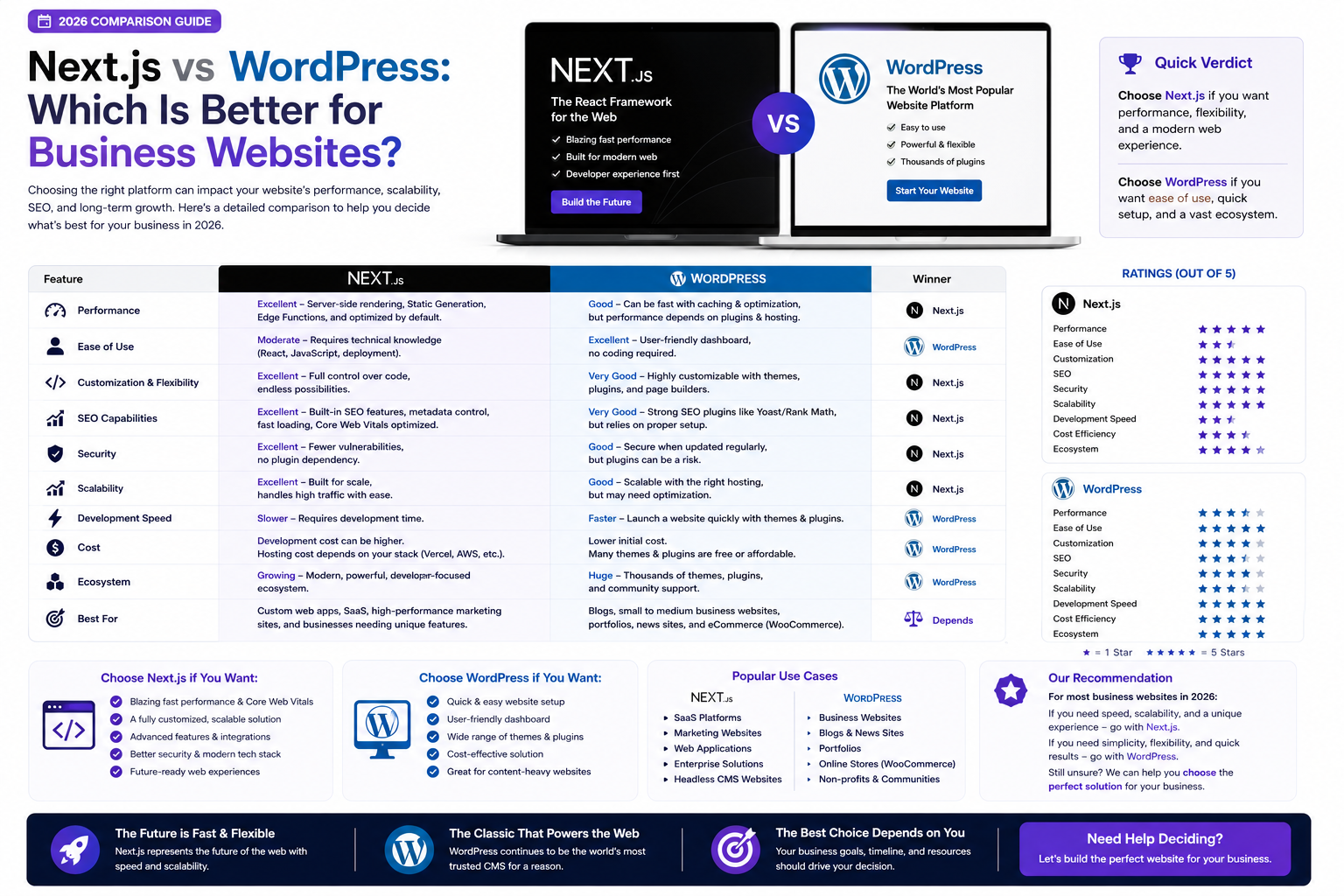

Compare Next.js vs WordPress for business websites. Covering performance, SEO, security, scalability, content management, cost, and which platform is right for your business needs.
Next.js vs WordPress: Which Is Better for Business Websites? (2026 Comparison)
Choosing the right technology for your business website is one of the most consequential decisions you will make. The platform you select affects your website speed, SEO performance, security, scalability, ease of management, and long-term costs. Two popular options represent very different approaches: Next.js — a modern React-based framework that generates static and server-rendered websites — and WordPress — the world's most widely used CMS powering over 40% of all websites.
What Is Next.js?
Next.js is a React-based framework developed by Vercel that enables developers to build fast, SEO-friendly websites with server-side rendering, static site generation, and incremental static regeneration. It is used by companies like Netflix, TikTok, Twitch, Hulu, and Notion. Key strengths: Exceptional performance with fast page loads and excellent Core Web Vitals, built-in SEO capabilities with server-side rendering and static generation, modern developer experience with React components and TypeScript, easy API routes for backend functionality, and seamless deployment on platforms like Vercel.
What Is WordPress?
WordPress is an open-source CMS that started as a blogging platform and evolved into a full website builder. It powers websites ranging from simple blogs to complex e-commerce stores through themes and plugins. Key strengths: User-friendly admin panel for non-technical users, massive ecosystem of themes and plugins, large community and extensive documentation, lower initial development cost using pre-built themes, and built-in blogging and content management capabilities.
Performance Comparison
| Aspect | Next.js | WordPress |
|---|---|---|
| Page Load Speed | Excellent (sub-second loads possible) | Moderate to slow (depends on plugins and hosting) |
| Core Web Vitals | Excellent out of the box | Requires optimization and caching plugins |
| Server Response | Fast with SSR and static generation | Slower due to PHP and database queries |
| Image Optimization | Built-in next/image component | Requires plugins for WebP and lazy loading |
| CDN Compatibility | Native support with Vercel | Requires third-party CDN integration |
SEO Comparison
Next.js provides built-in support for meta tags, Open Graph, and structured data through the Metadata API. Server-side rendering ensures search engines can fully index content. Static generation creates fast-loading pages that Google rewards. Clean, semantic HTML output with control over every element. Excellent Core Web Vitals scores boost rankings. WordPress offers SEO plugins like Yoast and Rank Math that simplify on-page SEO. However, theme and plugin bloat can create performance issues that hurt rankings. Achieving good Core Web Vitals requires careful optimization.
Security Comparison
Next.js has a minimal attack surface — it renders HTML and serves static assets. No traditional database for content. No plugins to exploit. No admin panel exposed to the internet. WordPress is the most targeted CMS by hackers due to its popularity. Vulnerabilities in themes and plugins are common attack vectors. The admin panel (wp-admin) is a frequent target for brute force attacks.
Cost Comparison
| Cost Factor | Next.js | WordPress |
|---|---|---|
| Development Cost | Higher (custom development) | Lower (themes and plugins reduce dev time) |
| Hosting Cost | Low (Vercel free tier for small sites) | Varies (Rs 500-Rs 5,000+/month depending on traffic) |
| Plugin/Extension Cost | None required | Premium plugins can cost $50-$500+/year each |
| Maintenance Cost | Lower (fewer moving parts) | Higher (updates, security, plugin conflicts) |
| Long-Term TCO | Often lower over 3+ years | Can increase with plugin subscriptions and optimization |
Which Should You Choose?
Choose Next.js if: You prioritize website speed and performance above all else. SEO is critical to your business strategy. You want a modern, future-proof technology stack. Security is a top concern. You plan to scale significantly. You are building a custom web application, SaaS product, or enterprise platform.
Choose WordPress if: You have a limited initial budget and need a website quickly. Non-technical team members need to manage content independently. You require extensive plugin functionality that exists in the WordPress ecosystem. You are building a content-heavy site like a news portal or magazine.
Why Choose RedGobble?
At RedGobble, we build high-performance digital products for startups, businesses, and enterprises. Our expertise includes custom website development, AI solutions, AI agent development, SaaS platforms, ERP and CRM systems, mobile app development, business automation, UI/UX design, SEO-friendly websites, and cloud deployment.
Based in Greater Noida, Uttar Pradesh, India, RedGobble provides custom software development, AI solutions, mobile app development, and web development services for businesses across India and worldwide.
Frequently Asked Questions
Is Next.js better than WordPress for SEO?
Yes. Next.js provides superior technical SEO foundations with faster page loads, better Core Web Vitals, server-side rendering, and static generation. Both can rank well, but Next.js has a clear technical advantage.
Can I manage a Next.js website without a developer?
Yes, when paired with a headless CMS like Sanity, Strapi, or Contentful. These provide user-friendly admin panels similar to WordPress while your website benefits from Next.js performance.
Is Next.js more expensive than WordPress?
Initial development costs are higher for Next.js because it requires custom development. However, long-term costs are often lower due to reduced hosting, plugin, maintenance, and optimization expenses.
Does Next.js support e-commerce?
Yes. Next.js works excellently with e-commerce platforms like Shopify (through the Storefront API), WooCommerce (headless), Medusa, and custom solutions. The performance advantage is significant for e-commerce conversion rates.
Can I migrate from WordPress to Next.js?
Yes. We regularly migrate WordPress websites to Next.js for clients seeking better performance, security, and scalability. The process includes content migration, URL preservation, and SEO continuity.
Which platform is better for a blog?
WordPress was built for blogging and offers the most mature blogging experience out of the box. However, Next.js with MDX or a headless CMS also provides excellent blogging capabilities with better performance.
Does Next.js need hosting?
Yes. Next.js deploys easily to Vercel (created by the same team), Netlify, AWS, or any Node.js hosting. Vercel offers a generous free tier suitable for many small to medium websites.
Is WordPress dying?
No. WordPress remains a viable platform for many use cases, particularly content-heavy websites and small businesses with limited budgets. However, for performance-critical business websites, modern frameworks like Next.js are increasingly preferred.
Conclusion
The choice between Next.js and WordPress depends on your priorities. If performance, SEO, security, and scalability matter most, Next.js is the clear winner. If budget, ease of use, and plugin ecosystem are primary concerns, WordPress remains a solid choice. For many businesses, the ideal solution combines Next.js performance with a headless CMS for content management.
Ready to start your project? Book a Free Consultation with the RedGobble team today.