Cloud-Based Software vs Traditional Software (2026 Comparison)
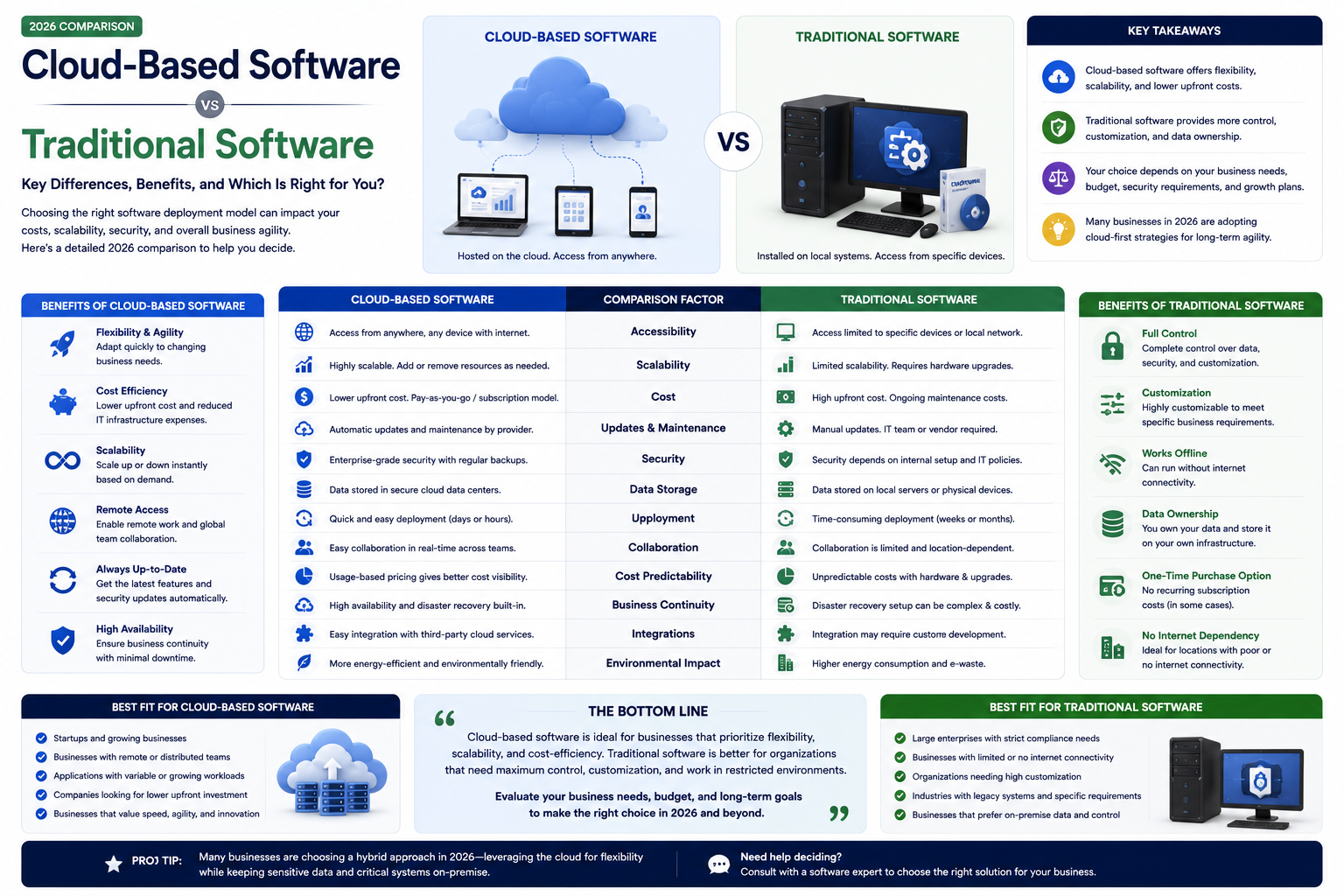

Compare cloud-based vs traditional on-premise software. Understand the differences in cost, accessibility, security, maintenance, scalability, and which is right for your business.
Cloud-Based Software vs Traditional Software (2026 Comparison)
The shift from traditional on-premise software to cloud-based solutions is one of the most significant technology trends of the past decade. Understanding the differences helps you make informed decisions about which deployment model is right for your business.
What Is Cloud-Based Software?
Cloud-based software (also called SaaS — Software as a Service) runs on the provider's servers and is accessed via the internet through a web browser. You pay a subscription fee and the provider handles all infrastructure, maintenance, updates, and security. Examples include Google Workspace, Salesforce, Slack, and Shopify.
What Is Traditional Software?
Traditional software is installed directly on your computers or local servers. You purchase a license (often a one-time fee plus annual maintenance), install the software on your hardware, and your IT team manages updates, security, and infrastructure. Examples include older versions of Microsoft Office (installed), on-premise ERP systems, and legacy accounting software.
Cost Comparison
| Aspect | Cloud-Based | Traditional |
|---|---|---|
| Upfront Cost | Low (monthly subscription) | High (license + hardware) |
| Ongoing Cost | Subscription fees | Maintenance + IT staff + hardware |
| Total Cost (5 years) | Typically lower for SMBs | Can be lower for very large deployments |
| Predictability | Predictable monthly cost | Variable (hardware failures, upgrades) |
| Capital vs Operating | Operating expense | Capital expenditure |
Accessibility
Cloud-based software is accessible from anywhere — office, home, mobile — with just a browser and internet connection. Traditional software is tied to specific computers or requires VPN access for remote work. The flexibility of cloud access has become essential in the era of remote and hybrid work.
Maintenance and Updates
Cloud software is always up to date — the provider handles all updates, security patches, and new features automatically. Traditional software requires manual updates by your IT team, which can be delayed, forgotten, or cause compatibility issues with other systems.
Security
Cloud providers invest heavily in security — dedicated security teams, advanced encryption, physical data center security, compliance certifications. Traditional software security depends entirely on your IT team's expertise and diligence. For most businesses, cloud security exceeds what they could implement themselves.
Scalability
Cloud software scales instantly — add users, increase storage, or upgrade plans in minutes. Traditional software requires purchasing additional licenses, provisioning hardware, and potentially upgrading infrastructure — a process that can take weeks or months.
For teams evaluating a cloud product build, see our SaaS development service.
Which Should You Choose?
Choose cloud-based if: You want low upfront costs, need anywhere-access, prefer predictable monthly pricing, do not want to manage IT infrastructure, or need to scale quickly.
Choose traditional if: You have strict data sovereignty requirements, operate in environments with unreliable internet, or have already invested heavily in on-premise infrastructure.
For most businesses in 2026, cloud-based software is the better choice.
Why Choose RedGobble?
At RedGobble, we build high-performance digital products for startups, businesses, and enterprises. Our expertise includes custom website development, AI solutions, AI agent development, SaaS platforms, ERP and CRM systems, mobile app development, business automation, UI/UX design, SEO-friendly websites, and cloud deployment.
Based in Greater Noida, Uttar Pradesh, India, RedGobble provides custom software development, AI solutions, mobile app development, and web development services for businesses across India and worldwide.
Frequently Asked Questions
Is cloud software secure?
Yes. Major cloud providers invest millions in security — encryption, dedicated security teams, compliance certifications, and physical data center security.
What happens if the internet goes down?
Most cloud software offers offline modes for essential functions. However, reliable internet is important for cloud software. Consider redundancy — backup internet connections.
Can I migrate from traditional to cloud software?
Yes. Cloud migration is common and well-understood. The process involves data migration, integration setup, and user training. RedGobble helps businesses transition smoothly.
Is cloud software more expensive long-term?
For most businesses, cloud software is more cost-effective when you factor in eliminated hardware costs, reduced IT staff requirements, and automatic updates.
Can cloud software be customized?
Off-the-shelf cloud software offers limited customization. For deep customization, custom cloud software development provides the best of both worlds — cloud benefits with tailored functionality.
Conclusion
The shift to cloud is not a trend — it is the new standard. Cloud-based software offers superior accessibility, lower upfront costs, automatic updates, and better security for most businesses. The question is rarely whether to use cloud software, but which cloud solutions best serve your needs.
Ready to start your project? Book a Free Consultation with the RedGobble team today.