Complete ERP Development Guide (2026)
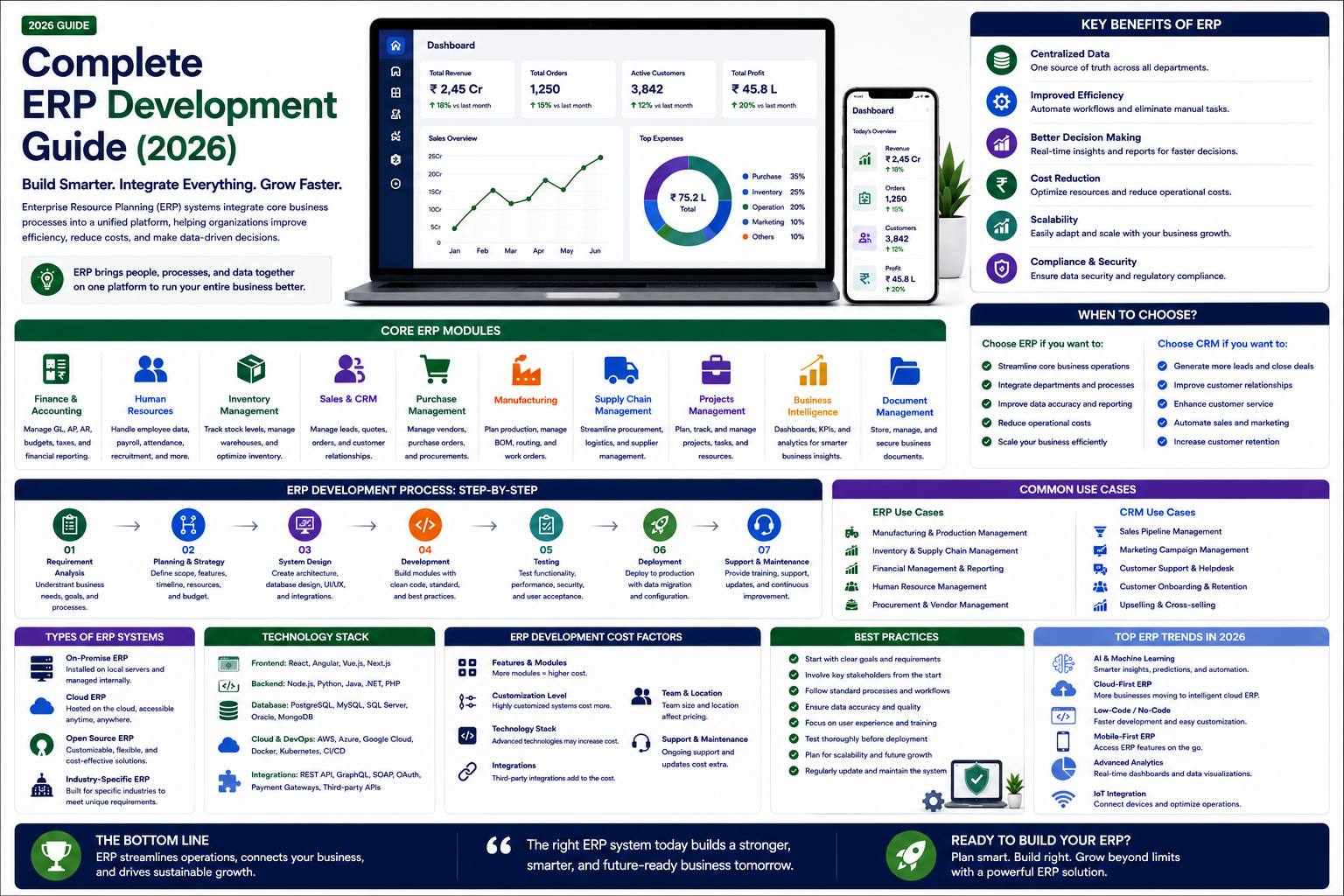

Comprehensive ERP development guide covering ERP modules, custom vs off-the-shelf ERP, development process, technology stack, costs, and best practices for successful ERP implementation.
Complete ERP Development Guide (2026)
Enterprise Resource Planning (ERP) software integrates all core business processes — finance, HR, inventory, supply chain, manufacturing, and customer management — into a single unified system. Whether you are building a custom ERP for your organization or developing an ERP product for the market, this guide covers everything you need to know.
What Is an ERP System?
An ERP system centralizes data and automates processes across departments, providing a single source of truth for the entire organization. Instead of Finance using one system, HR another, and Inventory a third — all with separate data that does not communicate — an ERP brings everything together.
Core ERP Modules
1. Finance and Accounting. General ledger, accounts payable and receivable, budgeting and forecasting, financial reporting and compliance, asset management, and expense management.
2. Human Resources (HR). Employee records and database, payroll and compensation, attendance and leave management, recruitment and onboarding, performance management, and training and development.
3. Inventory and Supply Chain. Inventory tracking and management, purchase order management, supplier management, warehouse management, demand forecasting, and logistics and shipping.
4. Manufacturing. Production planning and scheduling, bill of materials (BOM) management, quality control and assurance, work order management, and shop floor control.
5. Sales and Customer Management. Customer database (CRM integration), sales order management, quotation and pricing, contract management, and customer service and support.
6. Business Intelligence and Reporting. Real-time dashboards, custom report builder, data visualization, KPI tracking, predictive analytics, and export functionality.
Custom ERP vs Off-the-Shelf ERP
| Aspect | Off-the-Shelf ERP | Custom ERP |
|---|---|---|
| Cost | Lower initial, recurring licenses | Higher initial, no licenses |
| Fit | Generic, may require process changes | Tailored to your exact workflows |
| Implementation | Faster to deploy | Longer to build |
| Customization | Limited | Unlimited |
| Scalability | Depends on platform | Designed for your scale |
| Maintenance | Vendor managed | Your team or partner managed |
| Competitive Advantage | None (same as competitors) | Unique to your business |
When to Build a Custom ERP
Consider custom ERP development when your business has unique processes that off-the-shelf ERPs cannot accommodate without expensive customization, you want complete control over your data and infrastructure, you need deep integration with existing proprietary systems, your industry has specific compliance or regulatory requirements that generic ERPs do not address, or you want a competitive advantage through unique operational capabilities.
ERP Development Technology Stack
Modern ERPs are built with Next.js/React for the web frontend, Node.js or Python for backend APIs, PostgreSQL for the database (handles complex relational data well), Redis for caching and real-time features, cloud platforms like AWS or Azure for hosting, and Flutter for mobile access (inventory scanning, approvals on the go).
ERP Development Process
Phase 1: Business Process Analysis. Document all existing processes across departments. Identify pain points, bottlenecks, and inefficiencies. Define requirements for the new system. Prioritize modules — which to build first.
Phase 2: System Architecture Design. Database schema design for complex relational data. API architecture for cross-module communication. User roles and permission matrix. Integration points with existing systems.
Phase 3: Module Development. Build one module at a time, starting with the highest priority. Finance is typically first as other modules depend on it. Each module is developed, tested, and deployed incrementally.
Phase 4: Data Migration. Clean and prepare existing data for migration. Map data from legacy systems to the new ERP schema. Test migration with sample data before full migration. Execute migration with validation and rollback plans.
Phase 5: Training and Change Management. Train users on the new system — department by department. Create documentation and video tutorials. Provide hands-on support during the transition period. Collect feedback and address issues quickly.
ERP Development Cost in India
| ERP Type | Estimated Cost | Timeline |
|---|---|---|
| Basic ERP (2-3 modules) | Rs 8,00,000 - Rs 20,00,000 | 16-28 weeks |
| Mid-Range ERP (5-7 modules) | Rs 20,00,000 - Rs 60,00,000 | 28-48 weeks |
| Enterprise ERP (10+ modules) | Rs 50,00,000 - Rs 2,00,00,000+ | 40-72 weeks |
Why Choose RedGobble?
At RedGobble, we build high-performance digital products for startups, businesses, and enterprises. Our expertise includes custom website development, AI solutions, AI agent development, SaaS platforms, ERP and CRM systems, mobile app development, business automation, UI/UX design, SEO-friendly websites, and cloud deployment.
Based in Greater Noida, Uttar Pradesh, India, RedGobble provides custom software development, AI solutions, mobile app development, and web development services for businesses across India and worldwide.
Frequently Asked Questions
What is the difference between ERP and CRM?
ERP manages internal business operations — finance, HR, inventory, manufacturing. CRM manages customer relationships — sales, marketing, customer service. They complement each other.
How long does ERP development take?
Basic ERP with 2-3 modules takes 16-28 weeks. Enterprise ERP with 10+ modules takes 40-72 weeks or more.
Should I build a custom ERP or buy one?
Buy if your processes fit standard ERP workflows. Build if you have unique processes, need deep customization, or want competitive advantage through operational technology.
What are the biggest ERP implementation risks?
Scope creep (adding features endlessly), data migration issues, user resistance to change, inadequate training, and underestimating the time and resources required.
Can an ERP be cloud-based?
Yes. Modern ERPs are cloud-native, providing anywhere-access, automatic updates, and scalable infrastructure.
How do you ensure ERP data security?
Role-based access control, data encryption, audit logs, regular security audits, and compliance with relevant regulations (GDPR, ISO 27001).
Conclusion
A well-designed ERP system transforms how your organization operates — eliminating data silos, automating manual processes, and providing real-time visibility across your entire business. Whether you choose off-the-shelf or custom development, the investment in ERP pays dividends through improved efficiency, better decision-making, and scalable operations.
Ready to start your project? Book a Free Consultation with the RedGobble team today.