CRM Software Development Guide (2026)
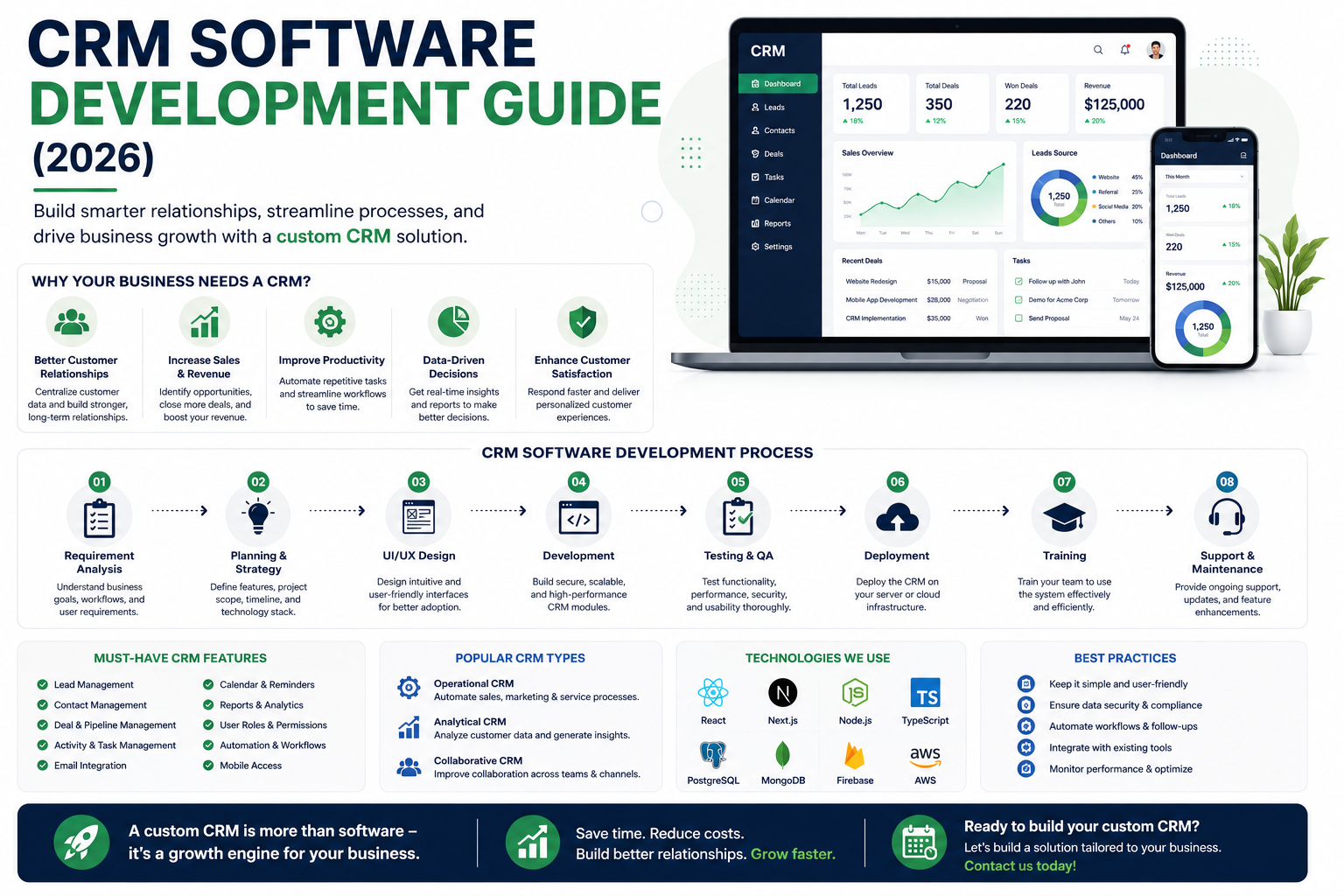
Complete CRM development guide covering core features, custom vs off-the-shelf comparison, development process, technology stack, costs, and best practices for CRM implementation.
CRM Software Development Guide (2026)
Customer Relationship Management (CRM) software is the backbone of sales, marketing, and customer service operations for businesses of all sizes. Whether you need a custom CRM tailored to your unique sales process or are building a CRM product for the market, this guide covers everything you need to know.
What Is a CRM System?
A CRM system centralizes all customer interactions — emails, calls, meetings, deals, support tickets — in one place. It provides a complete view of each customer relationship, from first contact through purchase and ongoing support.
Core CRM Features
1. Contact and Lead Management. Centralized contact database with full interaction history. Lead capture from websites, forms, and emails. Lead scoring and qualification. Activity tracking (calls, emails, meetings). Notes, tags, and custom fields for organization.
2. Sales Pipeline Management. Visual pipeline with drag-and-drop deal stages. Deal tracking with value, probability, and expected close date. Sales forecasting and quota tracking. Task and follow-up reminders. Quote and proposal generation.
3. Marketing Automation. Email campaign creation and management. Lead nurturing sequences. Campaign performance analytics. Landing page and form builders. Segmentation based on behavior and demographics.
4. Customer Service and Support. Ticket management system. Knowledge base and self-service portal. SLA tracking and escalation. Customer communication history. Feedback and satisfaction surveys.
5. Analytics and Reporting. Sales performance dashboards. Pipeline analysis and forecasting. Marketing campaign ROI. Customer lifetime value analysis. Custom report builder with export functionality.
6. Integrations. Email integration (Gmail, Outlook). Calendar synchronization. Communication tools (Slack, Teams, WhatsApp). Accounting and invoicing software. E-commerce platforms. Third-party APIs via webhooks and REST.
Custom CRM vs Off-the-Shelf CRM
| Aspect | Off-the-Shelf CRM | Custom CRM |
|---|---|---|
| Cost | Monthly subscription per user | Higher initial, no recurring per-user fee |
| Setup Time | Days to weeks | Weeks to months |
| Customization | Limited to platform capabilities | Fully tailored to your sales process |
| Scalability | Depends on platform pricing | Designed for your growth |
| Integration | Pre-built integrations | Custom integration with any system |
| Data Control | Vendor servers | Your infrastructure |
| Competitive Advantage | Same tools as competitors | Unique sales capabilities |
When to Build a Custom CRM
Consider custom CRM development when your sales process is unique and does not fit standard CRM workflows, you have specific compliance or data sovereignty requirements, you need deep integration with proprietary internal systems, you want to avoid per-user pricing that becomes expensive at scale, or your industry requires specialized functionality not available in generic CRMs.
CRM Development Technology Stack
Modern CRMs are built with Next.js/React for the frontend, Node.js for the backend API, PostgreSQL for the database, WebSockets for real-time updates, Redis for caching, and cloud platforms for hosting. Mobile CRM apps are built with Flutter for sales teams in the field.
For a CRM built around your sales workflow, see our CRM development solution.
Why Choose RedGobble?
At RedGobble, we build high-performance digital products for startups, businesses, and enterprises. Our expertise includes custom website development, AI solutions, AI agent development, SaaS platforms, ERP and CRM systems, mobile app development, business automation, UI/UX design, SEO-friendly websites, and cloud deployment.
Based in Greater Noida, Uttar Pradesh, India, RedGobble provides custom software development, AI solutions, mobile app development, and web development services for businesses across India and worldwide.
Frequently Asked Questions
What is the difference between CRM and ERP?
CRM focuses on customer relationships — sales, marketing, service. ERP focuses on internal operations — finance, HR, inventory. They serve different but complementary purposes.
How much does custom CRM development cost?
Custom CRM development in India typically ranges from Rs 5,00,000 for a basic system to Rs 30,00,000+ for an enterprise-grade CRM with advanced features and integrations.
Should I build or buy a CRM?
Buy if a standard CRM like HubSpot or Salesforce fits your process. Build if your sales process is unique, you need deep custom integrations, or per-user pricing would be cost-prohibitive at your scale.
How long does CRM development take?
A basic CRM takes 10-16 weeks. A comprehensive CRM with advanced features takes 20-40 weeks.
Can a CRM integrate with my existing systems?
Yes. Custom CRMs can integrate with any system via APIs. Off-the-shelf CRMs offer pre-built integrations with popular tools.
Do I need a mobile app for my CRM?
If your sales team works in the field, a mobile CRM app significantly improves adoption and data entry timeliness.
Conclusion
A CRM system is one of the highest-ROI investments a business can make. It improves sales efficiency, enhances customer relationships, and provides data-driven insights for growth. Whether you choose an off-the-shelf solution or custom development, the key is selecting a system your team will actually use.
Ready to start your project? Book a Free Consultation with the RedGobble team today.