Website Security Best Practices for Businesses (2026 Guide)
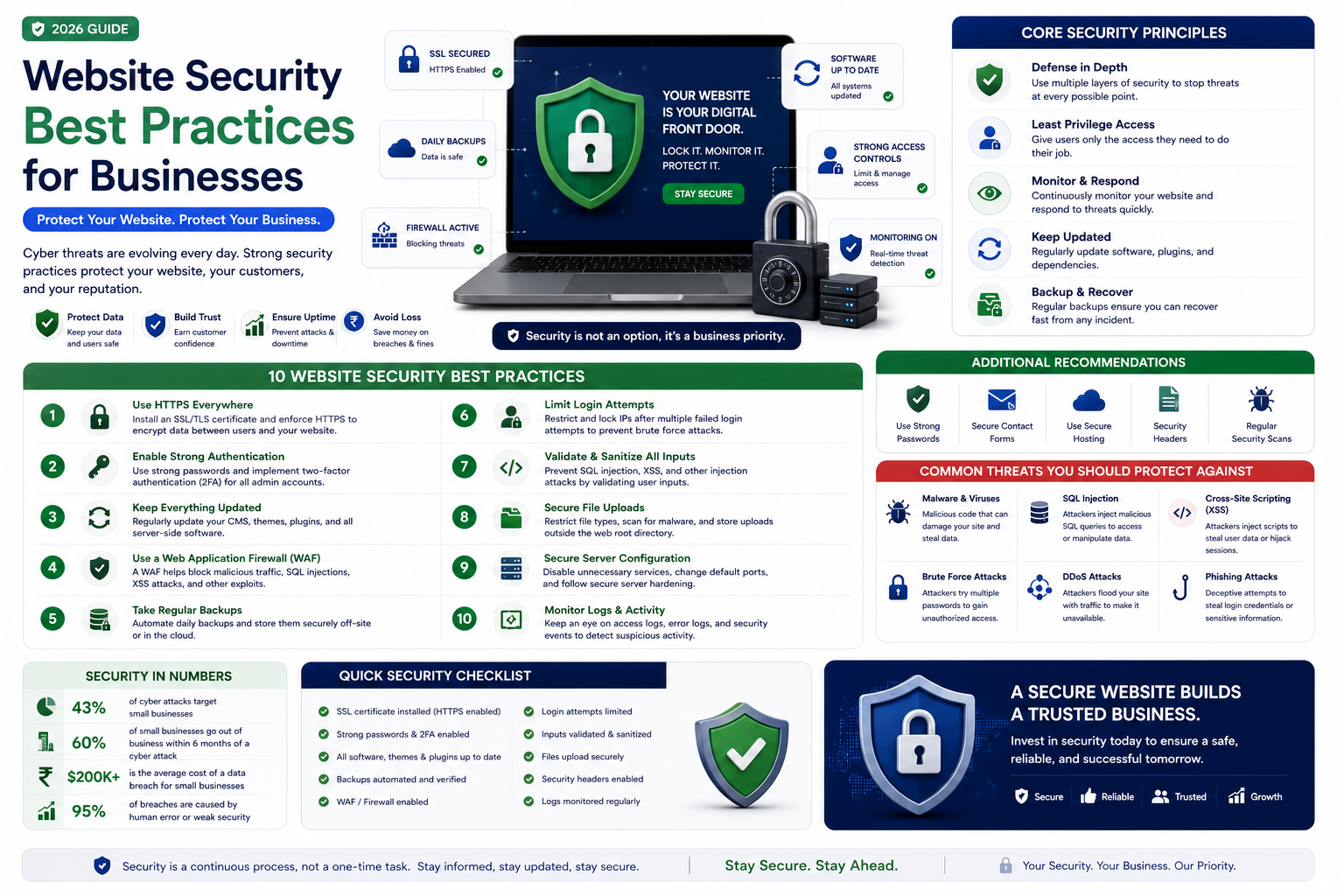

Essential website security best practices for businesses. Learn how to protect your website from hackers, malware, and data breaches with practical, actionable security measures.
Website Security Best Practices for Businesses (2026 Guide)
Website security is not optional — it is essential for protecting your business, your customers, and your reputation. A security breach can result in data loss, financial penalties, reputational damage, and lost customer trust. This guide covers the essential security practices every business website should implement.
1. Use HTTPS Everywhere
SSL/TLS certificates encrypt data between your website and visitors, preventing interception. Modern browsers flag non-HTTPS sites as not secure. Google uses HTTPS as a ranking signal. Obtain certificates through Let's Encrypt (free) or your hosting provider. Ensure all pages, not just login pages, use HTTPS.
2. Keep Software Updated
Outdated software — CMS, plugins, frameworks, server software — is the most common entry point for attackers. Apply security updates immediately when released. Remove unused plugins and themes. Subscribe to security mailing lists for your technology stack.
3. Implement Strong Authentication
Enforce strong password policies — minimum length, complexity requirements. Implement two-factor authentication for admin accounts. Limit login attempts to prevent brute force attacks. Use secure session management with appropriate timeout periods.
4. Regular Backups
Automated daily backups stored off-site ensure you can recover quickly from attacks, server failures, or accidental data loss. Test backups regularly — a backup you cannot restore is worthless. Maintain multiple backup versions to recover from issues that took time to discover.
5. Web Application Firewall (WAF)
A WAF filters and monitors HTTP traffic, blocking common attacks like SQL injection, cross-site scripting (XSS), and DDoS attempts. Cloud-based WAFs (Cloudflare, AWS WAF) are easy to implement and maintain.
6. Regular Security Scanning
Automated vulnerability scanning identifies known security issues in your code, dependencies, and configuration. Penetration testing simulates real attacks to uncover vulnerabilities. Conduct scans regularly — at minimum quarterly.
7. Secure Data Handling
Encrypt sensitive data at rest and in transit. Minimize data collection — only collect what you genuinely need. Implement proper access controls — limit who can access sensitive data. Have a clear data retention and deletion policy.
8. Incident Response Plan
Know what to do when a security incident occurs. Who is responsible? How do you contain the breach? How do you communicate with affected customers? How do you recover and prevent recurrence? Having a plan before an incident occurs dramatically reduces damage.
Why Choose RedGobble?
At RedGobble, we build high-performance digital products for startups, businesses, and enterprises. Our expertise includes custom website development, AI solutions, AI agent development, SaaS platforms, ERP and CRM systems, mobile app development, business automation, UI/UX design, SEO-friendly websites, and cloud deployment.
Based in Greater Noida, Uttar Pradesh, India, RedGobble provides custom software development, AI solutions, mobile app development, and web development services for businesses across India and worldwide.
Frequently Asked Questions
What is the most important website security measure?
HTTPS everywhere and keeping software updated are the two most impactful measures. They address the most common vulnerabilities.
How often should I backup my website?
Daily backups are recommended for active websites. E-commerce sites may need more frequent backups. Always test that backups can be restored.
Do small business websites need security?
Yes. Small businesses are frequent targets because attackers know they often have weaker security. A breach can be devastating for a small business.
What is a WAF and do I need one?
A Web Application Firewall blocks common attacks before they reach your website. Cloud-based WAFs are affordable and recommended for all business websites.
How do I know if my website has been hacked?
Signs include unexpected redirects, defaced pages, new admin accounts, unusual server activity, blacklisting by search engines, and complaints from customers.
What should I do if my website is hacked?
Take the site offline immediately. Restore from a clean backup. Change all passwords. Investigate how the breach occurred. Notify affected customers if data was compromised.
Conclusion
Website security is an ongoing commitment, not a one-time task. By implementing these best practices and maintaining vigilance, you protect your business, your customers, and your reputation from the growing threat of cyber attacks.
Ready to start your project? Book a Free Consultation with the RedGobble team today.